
- Personal, hands-on training
- Complete documentation & tutorials
- Customized support plans & more...
Tutorials
Tutorials in WMV format
These videos are formatted in Windows Media Video (WMV), suitable for Windows PC. Sometimes similar videos are provided specifically for clients in their accounts.
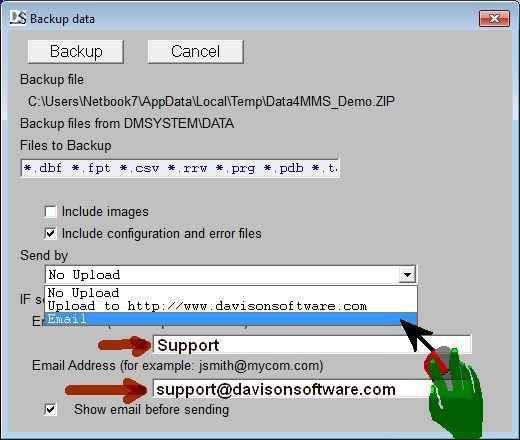 Click to see email option. Click to see email option. |
Your Data File Upload
You can upload your data to our web site.
Select the menu options shown in the video.
You can also send your data backup via email.
Select "File, Backup, Backup, Send by email".
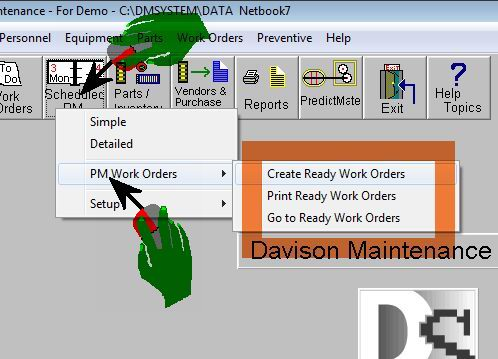 Click to see PM Work Order menu. Click to see PM Work Order menu. |
Updates - April 2011
Weekly routine for Preventive Maintenance
The PM Work Orders menu is a simple weekly routine.
- Create Ready Work Orders: Creates new PM work orders.
- Print Ready Work Orders: Print the new work orders.
- Go to Ready Work Orders: Leads you to PM work orders where you can manage, and Close the work orders as needed.
Other options allow automatic PM scheduling and paperless management to work stations, email, or handheld device.
Updates - January 2011
Updates - December 2010 - Preventive Maintenance
Transferring data between sites
Step 1: File, Environment, Tools, Transfer OUT ...
Click here to view Step 1
Step 2: Select the site, then File, Environment, Tools, Transfer IN ...
Click here to view Step 2
Documentation:
Click here for PDF document
Work Orders
Links from Excel spreadsheet
In special cases we process data with links from Excel spreadsheet to Davison CMMS or PredictMate. Some spreadsheets are complicated and require preparation for a link. The following tutorials show the preparation to link an Excel spreadsheet for processing to Davison CMMS data.
- Format the area as Text.
- Define a name for the area.
- Run the Addspace macro.
Select an area of data. Start one row before data.
Format all cells in the area as Text.
Define a name to identify the area of data
Select "Insert, Name, Define". Name the area "DATA".
If numbers were entered before formatting as Text:
Run the Addspace macro in cells where numbers were entered.